Build OctoberCMS Tailor blueprints visually
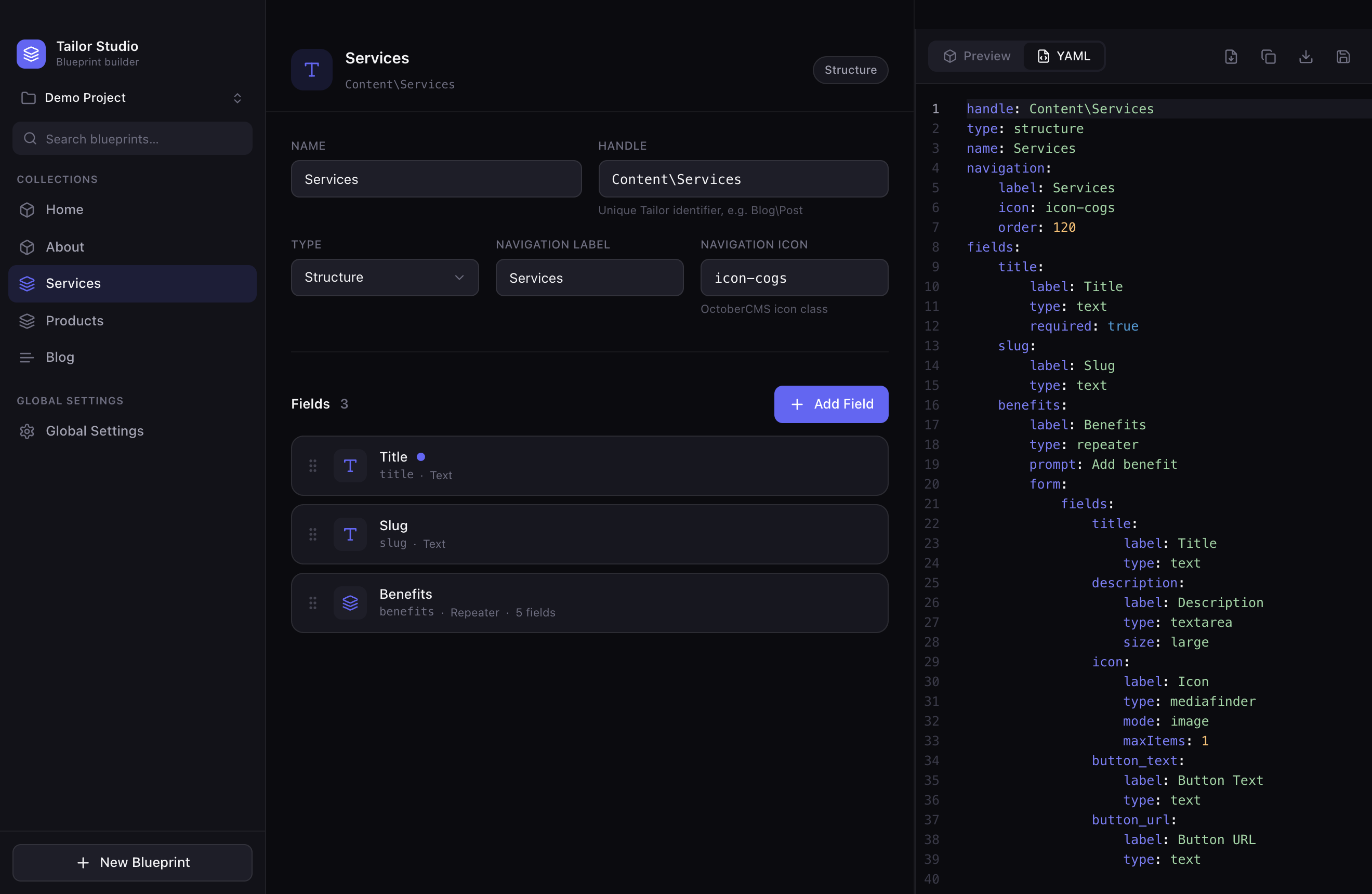
Tailor Studio is a visual blueprint builder for OctoberCMS Tailor. Drag fields, nest repeaters, wire entries relations, and export clean, valid Tailor YAML in real time — in your browser or as a native desktop app. No more hand-writing YAML.
Free · open source (MIT) · no account · runs instantly in your browser.
What is Tailor Studio?
Tailor Studio is a free, open-source visual blueprint builder for OctoberCMS Tailor. It replaces hand-written YAML with a three-panel visual editor: you design content schemas by adding and reordering fields, nesting repeaters and wiring entries relations, while the app generates valid OctoberCMS Tailor blueprint YAML in real time.
It is not a plugin builder. OctoberCMS already ships the Builder plugin for scaffolding plugins; Tailor Studio focuses exclusively on Tailor content blueprints and the YAML those blueprints use. You can run it instantly in any modern web browser, or download the native desktop app for macOS, Windows and Linux. It is released under the MIT license.
Everything you need to design Tailor schemas
A focused tool that speaks OctoberCMS Tailor conventions natively.
Visual blueprint editor
Set the handle, name, type (Single, Structure, Stream, Global) and backend navigation — all from a clean form.
17 field types
Text, Rich Editor, Media Finder, Code Editor, Dropdown, Color Picker, Repeater, Entries and more — each with its own options.
Repeater builder
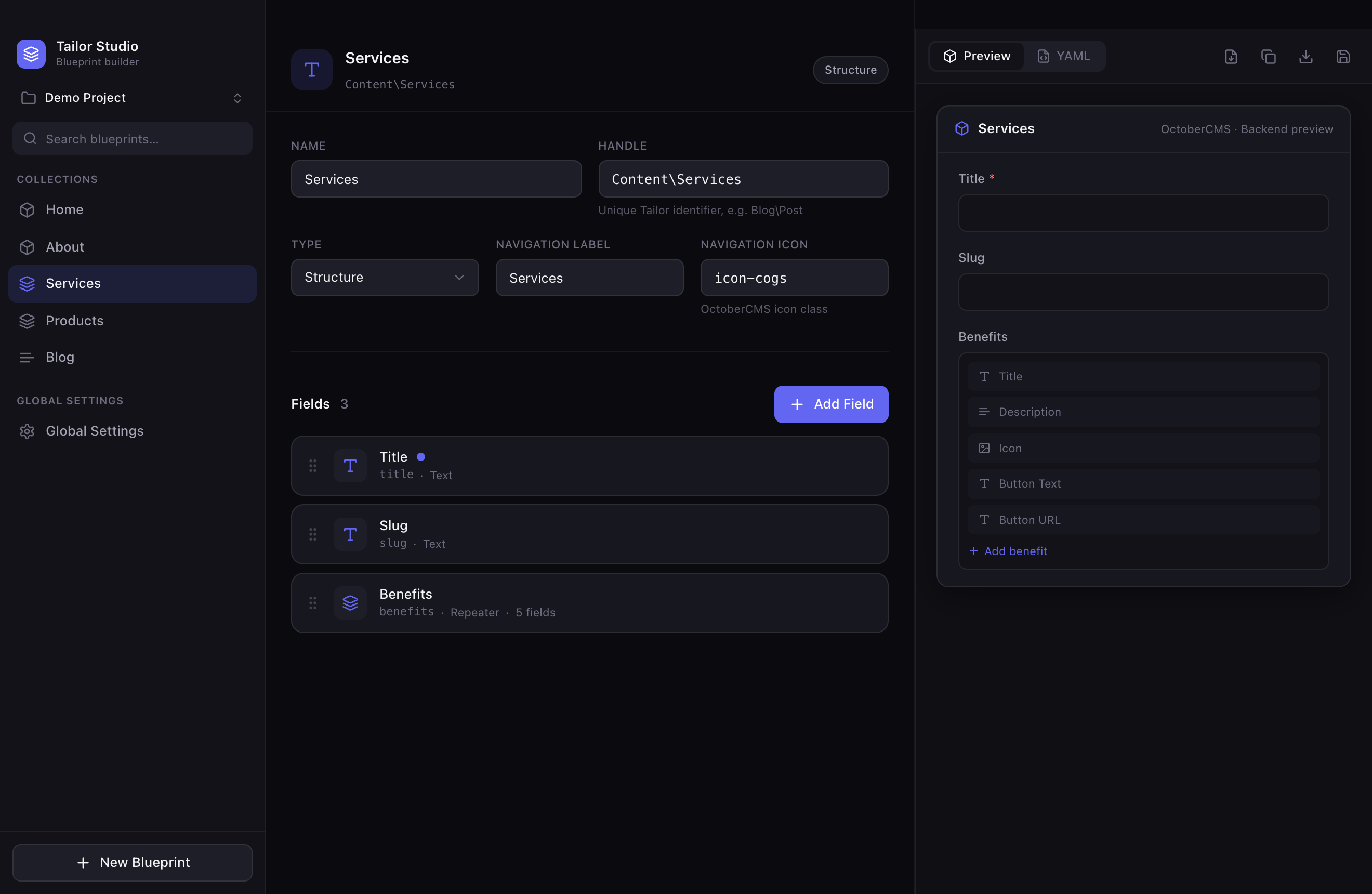
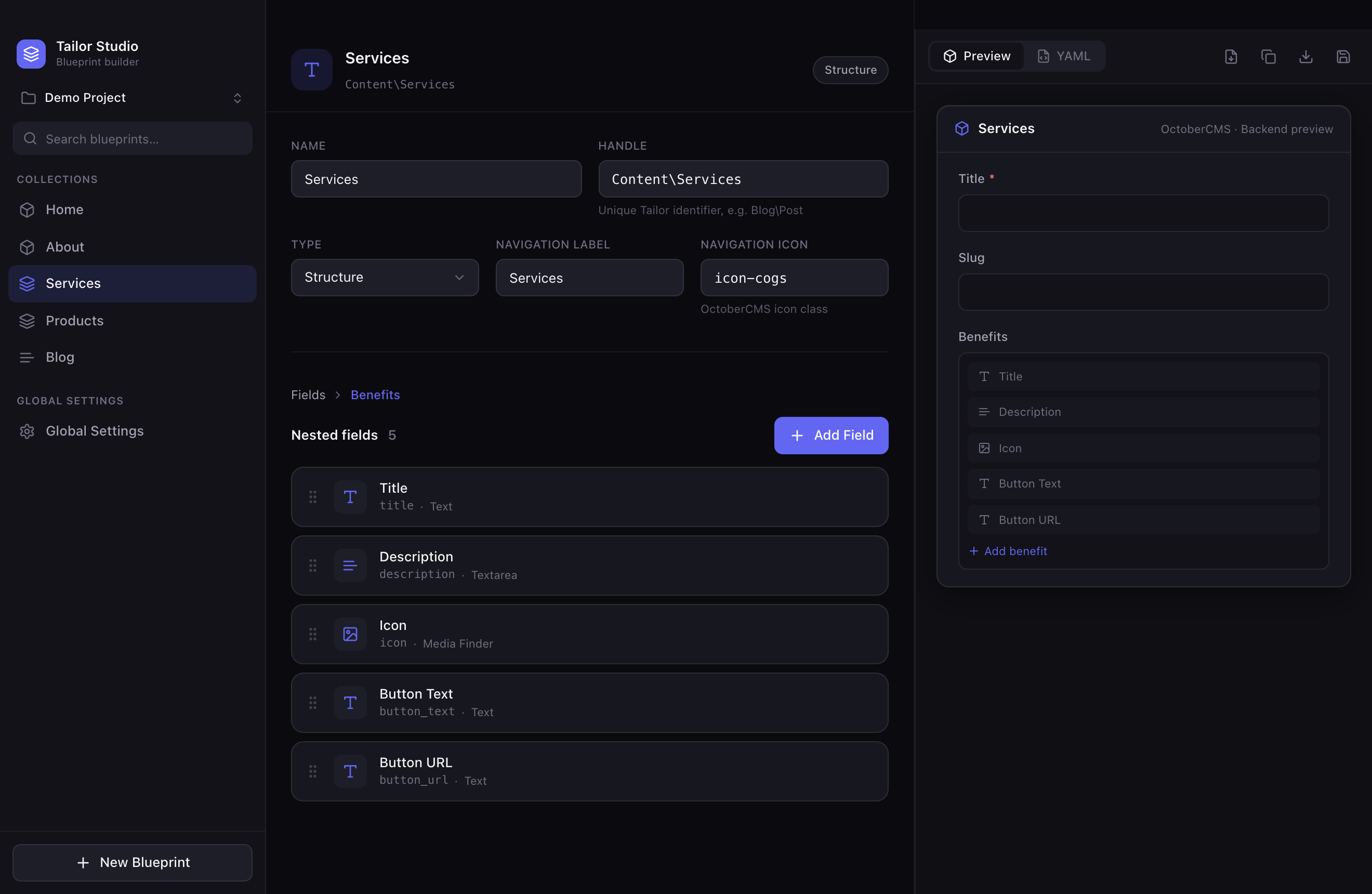
Open any repeater into a nested editor with breadcrumb navigation. Unlimited nesting, drag-sortable at every level.
Entries relations
Wire relations to other blueprints visually: source, relation type, display mode and max items.
Live YAML
A Monaco editor shows valid Tailor YAML as you build. Edit the YAML directly and it parses back into the UI.
Multiple projects
Create, rename, duplicate and switch between projects. Everything auto-saves locally so nothing is lost.
Why not just write Tailor YAML by hand?
Tailor blueprints use strict YAML with exact indentation and naming. Tailor Studio gives you visual speed while always showing the exact YAML it generates.
The problem it solves
- Hand-written blueprint YAML is slow and easy to break with indentation or naming mistakes.
- Field options (modes, relation types, repeater groups) are hard to remember.
- Refactoring nested repeaters and relations in raw text is error-prone.
- Tailor Studio turns all of this into a visual workflow and exports clean, convention-following YAML.
Who it’s for
- OctoberCMS developers building Tailor-based content models.
- Freelancers and agencies shipping client content schemas quickly.
- Designers and content modelers prototyping schemas without memorizing Tailor syntax.
- Anyone who wants a visual alternative to editing blueprint files by hand.
How it works
Three panels, one fast loop: design on the left, configure in the middle, see the result on the right.
Projects & blueprints
Switch projects and browse your blueprints, grouped into collections and global settings.
Fields & repeaters
Add fields from a searchable picker, drag to reorder, and dive into repeaters for nested structures.
Preview & YAML
Check the backend form preview, copy or export the generated Tailor YAML, or save the whole project.
handle: Shop\Products
type: structure
name: Products
fields:
    title:
        label: Title
        type: text
        required: true
    image:
        label: Image
        type: mediafinder
See it in action
Platforms & technical specs
Use it instantly in the browser, or install the native desktop app. Same editor, your choice.
| Web app | Runs in any modern browser — nothing to install. Projects are saved locally in your browser. Open the web app → |
|---|---|
| Desktop app | Native builds for macOS (Apple Silicon & Intel), Windows and Linux. Download the latest release → |
| Price & license | Free and open source under the MIT license. |
| Built with | Tauri 2 (Rust shell), Vue 3 + TypeScript, Vite, Pinia, TailwindCSS and Monaco Editor. |
| Field types | 17 types: Text, Textarea, Markdown, Rich Editor, Number, Date, Switch, Checkbox, Dropdown, Color Picker, Media Finder, File Upload, Code Editor, Repeater, Entries, Section, Partial. |
| Themes & languages | Dark / Light / System theme; English and Slovak (Slovenčina) interface. |
| Data & privacy | Works fully offline. Projects stay on your device — no account, no server, no tracking. |
Roadmap
What’s shipped and what’s planned next. Open source — contributions welcome on GitHub.
- ShippedMulti-project workspace with local autosave, blueprint templates gallery, and a single-pane mobile layout.
- PlannedAI blueprint generation — describe a content model in plain language and get a Tailor blueprint.
- PlannedHTML → Tailor blueprint conversion.
- PlannedLive connection to an OctoberCMS project.
- PlannedTailor diff viewer to compare blueprint versions.
- PlannedDedicated global-settings builder and full multi-file project persistence on disk.
Frequently asked questions
What is Tailor Studio?
Tailor Studio is a free, open-source visual blueprint builder for OctoberCMS Tailor. Instead of hand-writing YAML, you design content schemas in a three-panel visual editor and the app generates valid Tailor blueprint YAML in real time. It runs in your browser and is also available as a native desktop app for macOS, Windows and Linux.
What problem does it solve?
Tailor blueprints are defined in YAML files with strict indentation and naming conventions, which are slow and error-prone to write by hand. Tailor Studio replaces that manual work with a visual editor: you add and reorder fields, nest repeaters and wire relations, and it produces clean, convention-following Tailor YAML you can copy or export immediately.
Who is it for?
OctoberCMS developers, freelancers and agencies who build Tailor-based content models and want a fast, visual alternative to writing blueprint YAML by hand — plus designers and content modelers who want to prototype schemas without memorizing Tailor syntax.
Why not just edit Tailor YAML manually?
You still can — Tailor Studio includes a live Monaco YAML editor and round-trips your edits back into the UI. But building by hand means remembering every field option, getting indentation right, and validating relations yourself. Tailor Studio gives you the visual speed of a form builder while always showing the exact YAML it generates, so you keep full control without the typos.
How is it different from the OctoberCMS Builder plugin?
The OctoberCMS Builder plugin scaffolds plugins (models, controllers, migrations, forms and lists). Tailor Studio is not a plugin builder — it focuses exclusively on Tailor content blueprints and the YAML those blueprints use. It complements Builder rather than replacing it.
Can it import existing blueprints?
Yes. You can import existing Tailor blueprint YAML and it parses back into the visual editor, so you can refactor or extend blueprints you already have. Editing the live YAML also updates the UI in real time.
Does it support Repeaters and Entries relations?
Yes. The repeater builder opens any repeater into a nested editor with breadcrumb navigation and supports unlimited nesting, drag-sortable at every level. The entries relation builder lets you configure the source blueprint, relation type, display mode and maximum items visually.
Which field types are supported?
Text, Textarea, Markdown, Rich Editor, Number, Date, Switch, Checkbox, Dropdown, Color Picker, Media Finder, File Upload, Code Editor, Repeater, Entries, Section and Partial — 17 field types in total.
Is it free and open source?
Yes — free and open source under the MIT license. Use the hosted web version, download a desktop build, or build it yourself from source on GitHub.
What platforms are supported?
Tailor Studio runs in any modern web browser with nothing to install, and there are native desktop builds for macOS (Apple Silicon and Intel), Windows and Linux, produced automatically on every release.
Does it support light mode and other languages?
Yes. In Settings you can switch between Dark, Light and System themes, and choose the interface language — English or Slovak (Slovenčina).
Stop writing Tailor YAML by hand
Design your OctoberCMS content schemas visually and ship them in minutes.